Life science marketing teams often work with spreadsheets filled with search queries, scientific terms, and industry phrases. These lists capture the questions that clinical project managers, principal investigators, and procurement specialists ask when searching for outsourced services or technical solutions. However, a list of search queries does not automatically create a clear, usable website.
From Keyword Research to Content Architecture: SEO Planning for Life Science Companies
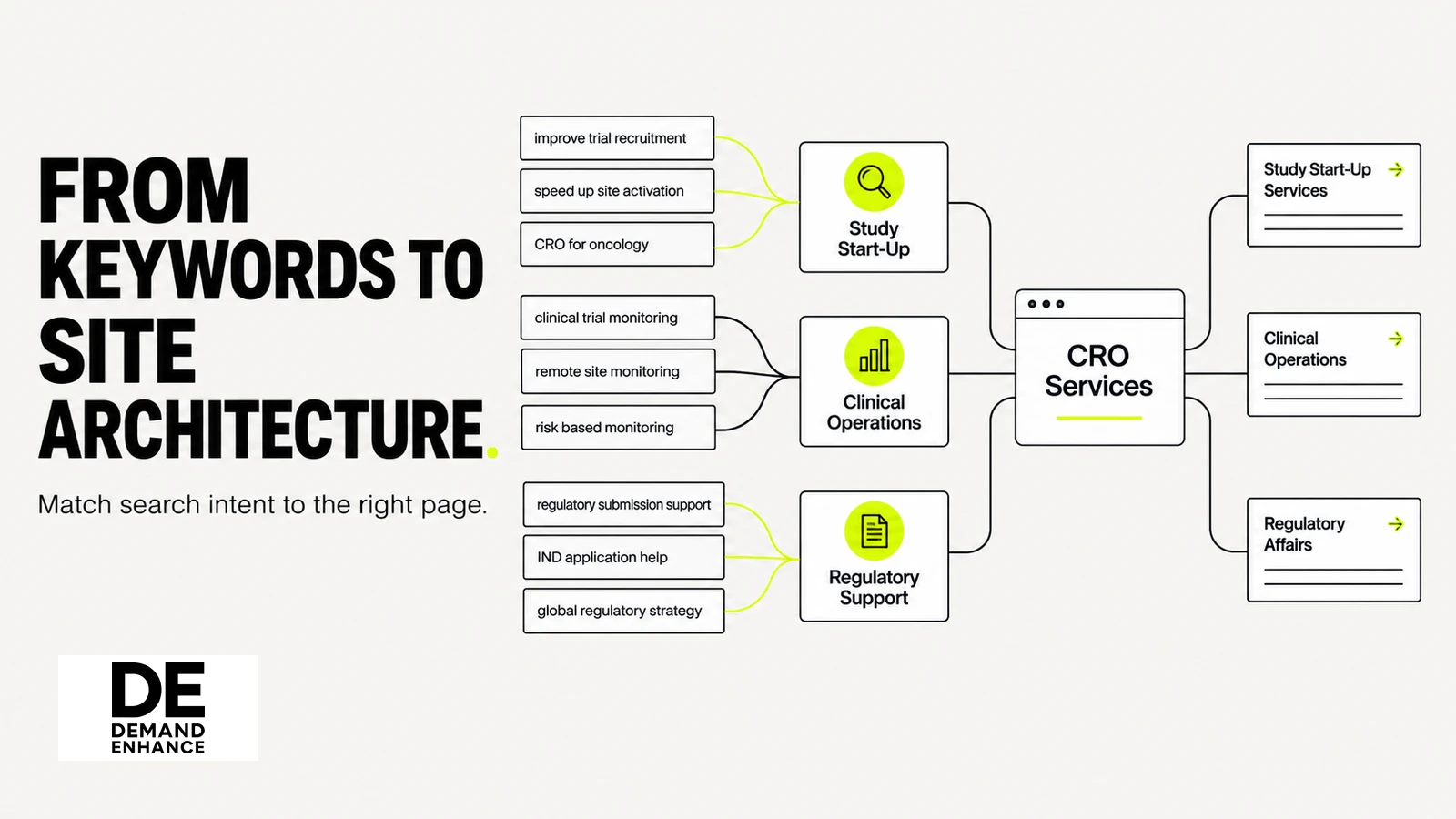
The most important step in planning an SEO strategy is moving from raw search data to a structured content architecture. This process requires organizing validated buyer questions into a clear site hierarchy where every page has a distinct purpose, addresses a specific audience need, and connects directly to verified capabilities. Without careful structural planning, even well-written technical pages can leave visitors confused about where to find relevant services. Bridging keyword research and content architecture helps prospective clients find the information they need to evaluate your organization.
The Step Between a Keyword List and a Useful Site
Transforming search data into an intuitive navigation structure requires looking beyond search volumes. Rather than treating keywords as isolated targets for new pages, treat buyer intent as a guide for how pages should be organized, grouped, and linked.
Why one keyword does not automatically mean one page
Early search optimization tactics often created a separate page for every slight phrasing variation. If prospective clients searched for multiple variations of a laboratory assay, marketing teams sometimes built separate pages for each term. That approach produces thin, repetitive content that confuses visitors evaluating specialized contract research or manufacturing services.
Modern content planning focuses on grouping related semantic queries under a shared primary intent. If a process engineer searches for optimization parameters for a cell-culture process alongside common scale-up bottlenecks for that same process, both queries represent parts of the same technical evaluation. They do not require separate URLs. A well-planned site covers those connected questions on a comprehensive capability page or within an organized topic cluster. Creating separate URLs for each related query scatters relevant information and makes it harder for evaluators to get a complete picture.
Start with verified services, audiences, and tasks
A content architecture should reflect an organization’s real capabilities and workflows. Before creating new website directories or assigning page titles, establish your organization’s verified service scope. The content hierarchy should mirror actual operations, define the exact audiences you support, and provide the technical details those evaluators need.
For example, an outsourced testing provider should distinguish whether its laboratory services support preclinical screening or regulated clinical trial phases. This distinction helps visiting evaluation teams immediately determine whether a provider has the appropriate facilities and quality standards for their project. Grounding your site architecture in verified capabilities prevents teams from building content around services they cannot fulfill. Using the validation steps outlined in Keyword Research Strategy for CRO and Biotech Companies helps ensure that search terms align with what your organization actually offers.
Define Page Roles Before Choosing URLs
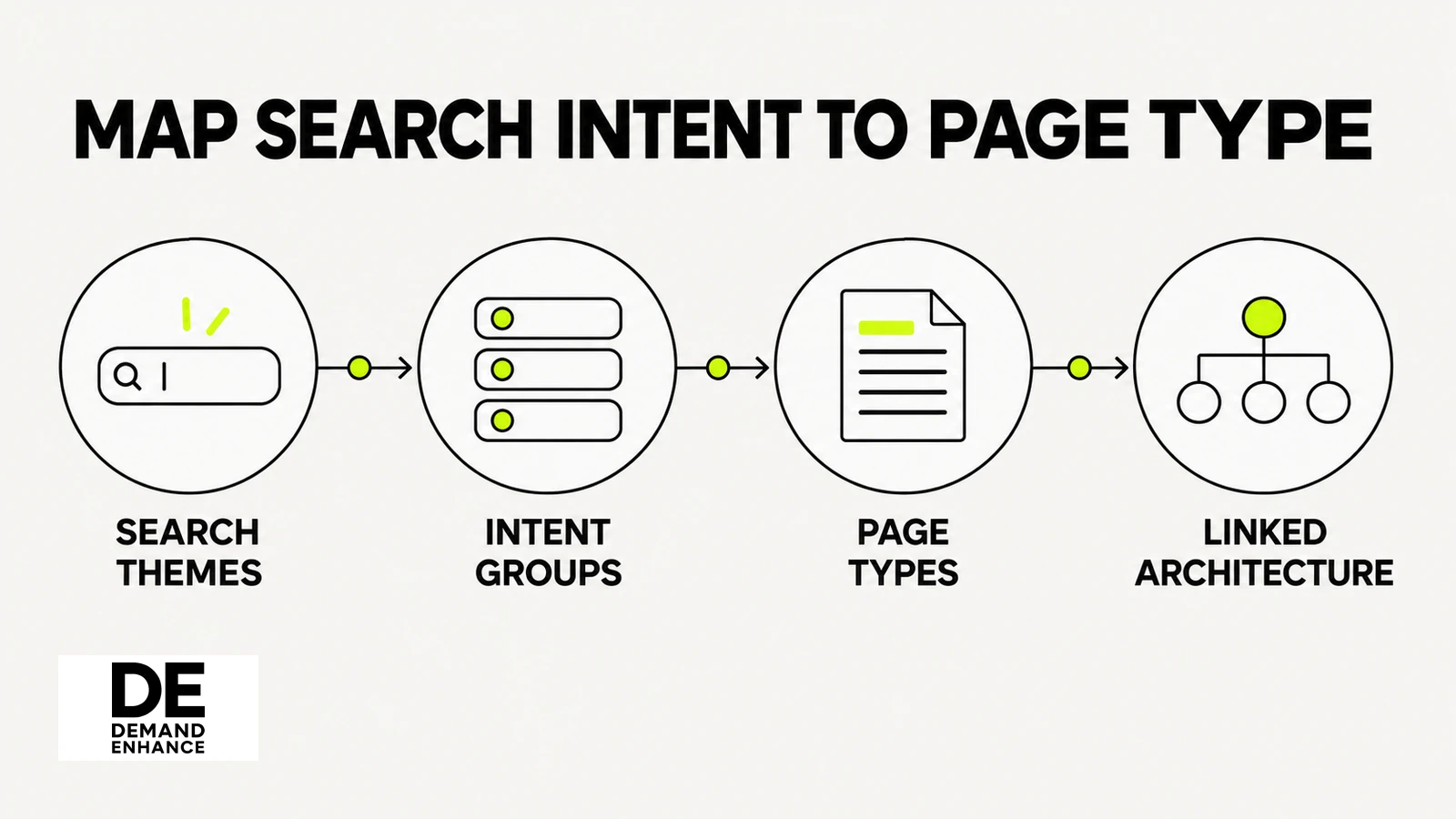
Before choosing URL paths, creating page wireframes, or drafting text, assign a clear functional role to every proposed page. Defining a page’s role clarifies its target reader, the required technical depth, and the appropriate next step for the visitor.
Service and capability pages
Service and capability pages form the core commercial foundation of a life science website. These pages must answer the specific technical and operational questions asked during vendor evaluations.
When planning a capability page, design the layout to answer evaluation questions directly:
- Does the page specify batch sizes, equipment models, or detection limits?
- Does it clearly state assay turnaround times or process transfer stages?
- Does it explain quality standards and regulatory compliance documentation?
Structuring service pages around verifiable technical specifications ensures that visitors find substantive information rather than generic marketing statements.
Modality, method, application, and problem-solving pages
In addition to core service directories, life science websites need pages dedicated to specific modalities, testing methods, and practical applications. These pages often connect across different service lines.
For example, while an organization might list analytical testing as a broad capability, a visiting scientist may be searching for solutions to a specific purity assay challenge or stability issue. A well-planned architecture connects these focused problem-solving pages to the broader service hierarchy. This allows an evaluator searching for a specific protocol or technical challenge to find practical details and then navigate to the primary service page.
Technical resources and supporting explainers
To support claims made on commercial service pages, a website needs technical resources that provide deeper documentation. These supporting assets include application notes, white papers, methodology summaries, and case examples.
Within the site architecture, these resources provide evidence for evaluators who require detailed proof before contacting a provider. Planning these informational pages for human evaluators works alongside backend indexing practices. While organizing content logically helps technical buyers find documentation, it also complements the technical formatting practices described in How to Structure Life Science Content So Google and AI Tools Understand Your Expertise.
Group Topics by Intent and the Answer Each Page Owns
After defining page roles, map search intent to specific pages. Giving each page ownership over a distinct question prevents content overlap and keeps the site navigation clear.
Content architecture planning checklist
- Start with verified services, audiences, workflows, and buyer tasks before turning keyword clusters into page assignments.
- Decide whether each topic belongs on a capability page, application resource, or educational article based on intent and needed technical depth.
- Map parent-child and contextual links, then assign a content owner, supporting evidence, and review date for each page.
Put the idea into practice
Choose a page role for the query
A set of assay queries includes both basic definitions and vendor evaluation questions. How should the architecture handle them?
Separate learning and evaluation
Choose this when the queries reflect materially different audience tasks. Place basic concepts in an educational resource and vendor-specific details on a capability page, then connect the pages with clear links that explain their relationship.
Consolidate related evaluation terms
Choose this when wording variations all describe the same technical evaluation. Give the main capability page ownership of that intent, answer related questions within it, and avoid creating thin pages that fragment useful detail during technical review.
Build the architecture from intent
Group the queries
Cluster terms by audience, task, and evaluation stage. Separate genuinely different needs from close wording variants so page assignments follow the intended answer rather than raw keyword count.
Assign page roles
Decide which topics need a service page, focused application resource, or educational explainer. Confirm each role reflects verified operations and gives the reader an appropriate next step.
Connect and govern
Map parent-child and contextual links, then record the owner, evidence, and review date for every page. Audit later for overlapping, orphaned, or outdated resources when services change.
Select a step to explore the idea.
Separate overlapping terms from genuinely different needs
During content planning, teams often encounter technical terms that look similar but reflect different stages of buyer evaluation. Separating these intents is essential for building an effective content structure.
Consider the difference between a student searching for an overview of chromatography principles and a biopharma project lead looking for a validated purification method for a recombinant protein. The first search represents an educational query that belongs in a blog post or glossary. The second represents an evaluation query that belongs on a commercial capability page with specific method parameters. Clear architecture separates general educational content from commercial service pages that guide visitors toward an inquiry.
Decide when to combine, split, or update a page
A common question during architecture planning is whether to address related topics on one page or divide them across multiple URLs. The decision depends on the depth required by the reader:
- Combine: If a technical term represents a minor variation or specific step within an established service, include it on the primary service page rather than creating a separate URL.
- Split: If an application involves distinct regulatory guidelines, requires dedicated instrumentation, and serves a different buying audience, create a standalone page for that topic.
- Update: If an existing page covers a core topic but lacks current method details or answers to common questions, update the existing URL instead of publishing a competing post.
Connect the Architecture with Internal Links
Agentic SEO may help life science marketers draft candidate internal-link paths across therapeutic and service clusters. Following a site-architecture audit, automated or manual suggestions should be checked against page purpose, hierarchy, and destination accuracy by an editor before link updates are published.
A sound content architecture requires clear linking between pages. Once page roles and topic boundaries are established, internal links provide navigation paths that help visitors explore related capabilities and evidence.
Parent-child links that explain hierarchy
Hierarchical linking establishes vertical connections between broad service categories and specialized sub-services. A parent category page—such as an overview of analytical testing services—should link downward to specific assay pages. In turn, child pages should link back to their parent category through breadcrumb trails and sub-navigation menus.
Clear vertical links help visitors understand how individual services fit into broader offerings. They also allow evaluators reviewing a specific technique to explore the provider’s related capabilities.
Contextual links that help a technical reader take the next step
While parent-child menus provide primary site navigation, contextual in-text links guide readers across related topics. Technical buyers rarely navigate websites in a simple linear path; an evaluator reading an application note may want to review the provider’s instrumentation, quality certifications, or facility specifications.
Contextual links within the body copy should guide the reader naturally to the next relevant page:
- Link from educational explainers to related commercial capability pages.
- Link from service overviews to specific validation data or case examples.
- Link from technical descriptions to relevant inquiry or consultation forms.
Anticipating these navigation needs during the planning phase ensures that visitors can find supporting details without hunting through complex menus.
Govern the Architecture Over Time
A content architecture requires ongoing oversight after a website launches. As scientific methods develop and regulatory requirements change, the site structure must be reviewed and maintained to ensure technical accuracy.
Page owner, evidence, review date, and change history
Every page in the architecture should have documented governance details:
- Page owner: The marketing team member or subject-matter expert responsible for content accuracy.
- Supporting evidence: Links to internal validation documents, facility lists, or regulatory standards that support the text.
- Review schedule: Established review intervals to recheck technical details with laboratory leads.
- Change log: A brief record of updates, added parameters, or retired capabilities.
Assigning clear ownership prevents service pages from becoming outdated when laboratory equipment is replaced, facility certifications are renewed, or service lines change.
Detect overlap, orphaned pages, and outdated material
Regular site audits help prevent structural confusion as new content is published over time:
- Content overlap: Check for multiple blog posts or service pages competing for the same technical query, and consolidate them into one authoritative resource.
- Orphaned pages: Identify useful technical assets that lack incoming internal links from main service directories or navigation menus.
- Outdated material: Archive or update pages describing discontinued methods or superseded regulatory standards.
Routine audits keep the site navigation clean and ensure that prospective clients find accurate, current information.
A Practical Sequence from Research to Launch
Translating keyword research into a functional content architecture follows five distinct steps:
- Group search queries by intent: Cluster search terms by audience task and evaluation stage rather than individual keyword strings.
- Assign specific page roles: Decide whether each topic belongs on a commercial capability page, a focused application note, or an educational article.
- Draft the site hierarchy: Organize pages into clear parent-child directories that reflect real service relationships.
- Plan internal linking paths: Map vertical hierarchy links and contextual in-text links before drafting begins.
- Establish governance standards: Assign technical reviewers and review schedules to keep pages accurate after publication.
By following this sequence, life science marketing teams can turn search research into a structured, navigable website that supports technical evaluations.
To discuss building a content architecture that reflects your technical capabilities, contact Demand Enhance.
Frequently asked questions
How should a team group keywords into pages?
Group queries by the audience task and the answer a page can provide, rather than by small wording variations. Keep related questions together when one well-structured page can address them without becoming unclear or overly broad.
What belongs on a commercial capability page?
A capability page should explain the service's verified scope, relevant processes, and practical boundaries for the intended buyer. Include technical detail only when the organization can substantiate it, then link to supporting resources that genuinely help evaluation.
How do internal links support content architecture?
Useful internal links explain how related pages fit together and help readers reach the next relevant detail. Connect broad service pages to specific methods or applications, and link supporting resources back to the capability they clarify.
Sources and further reading
Demand Enhance
Structure search research into useful page roles
Discuss how to turn validated buyer questions into a content architecture for your services with Demand Enhance. Bring your current keyword groups and a list of existing capability pages.
Discuss your priorities